This feature is primarily for large organizations with complex deployment and governance needs.
With gateway relay, an LLM inference request can be routed through multiple independent TensorZero Gateway deployments before reaching a model provider. This enables you to enforce organization-wide controls (e.g. auth, rate limits, credentials) without restricting how teams build their LLM features. A typical setup has two tiers:
  • Edge Gateways: Each team runs their own gateway to manage prompts, functions, metrics, datasets, experimentation, and more.
  • Relay Gateway: A central gateway enforces organization-wide controls. Edge gateways forward requests here.
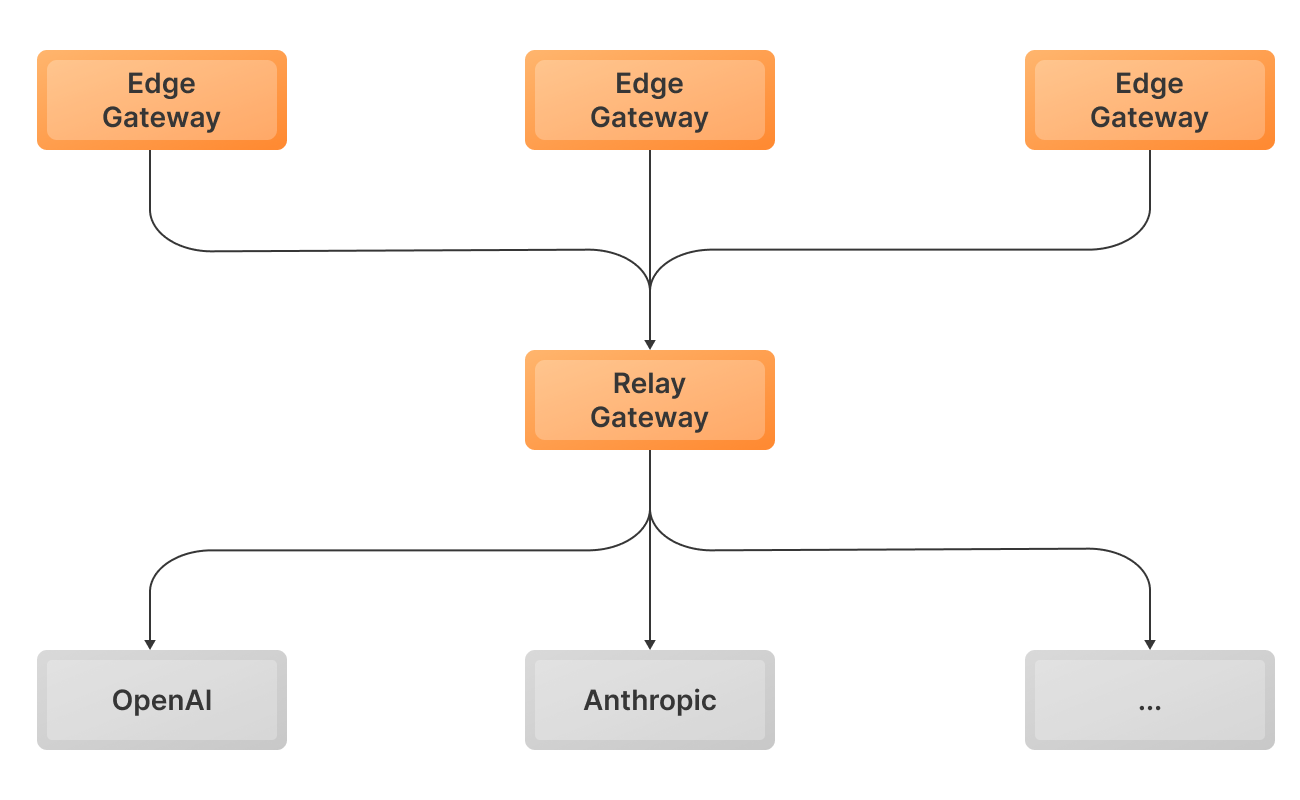
Diagram showing a two-tier TensorZero Gateway deployment with edge gateways forwarding requests to a relay gateway This guide shows you how to set up a two-tier TensorZero Gateway deployment that manages credentials in the relay.

Configure

You can find a complete runnable example of this guide on GitHub.
1

Configure your relay gateway

You can configure auth, rate limits, credentials, and other organization-wide controls in the relay gateway. See below for an example that enforces auth on the relay.We’ll keep this example minimal and use the default gateway configuration for the relay gateway.
2

Configure your edge gateway

Configure the edge gateway to route inference requests to the relay gateway:
edge-config/tensorzero.toml
[gateway.relay]
gateway_url = "http://relay-gateway:3000"  # base URL configured in Docker Compose below
3

Deploy both gateways

Let’s deploy both gateways, but only provide API keys to the relay gateway.
docker-compose.yml
services:
  edge-gateway:
    image: tensorzero/gateway
    volumes:
      # Mount our tensorzero.toml file into the container
      - ./edge-config:/app/config:ro
    command: --config-file /app/config/tensorzero.toml
    ports:
      - "3000:3000"
    extra_hosts:
      - "host.docker.internal:host-gateway"

  relay-gateway:
    image: tensorzero/gateway
    command: --default-config
    environment:
      - OPENAI_API_KEY=${OPENAI_API_KEY:?Environment variable OPENAI_API_KEY must be set.}
    extra_hosts:
      - "host.docker.internal:host-gateway"
If you’re planning to set up ClickHouse or Postgres for both gateways, make sure they use separate logical databases. It’s fine for them to share the same deployment or cluster.
4

Make an inference request to the edge gateway

Make an inference request to the edge gateway like you normally would. You can use either the TensorZero Inference API or the OpenAI-compatible Inference API.To keep things simple, let’s make a request using curl:
curl -X POST "http://localhost:3000/inference" \
  -H "Content-Type: application/json" \
  -d '{
    "model_name": "openai::gpt-5-mini",
    "input": {
      "messages": [
        {
          "role": "user",
          "content": "Write a haiku about TensorZero."
        }
      ]
    }
  }'
{
  "inference_id": "01940627-935f-7fa1-a398-e1f57f18064a",
  "episode_id": "01940627-8fe2-75d3-9b65-91be2c7ba622",
  "variant_name": "gpt-5-mini",
  "content": [
    {
      "type": "text",
      "text": "Wires hum with pure thought,  \nDreams of codes in twilight's glow,  \nBeyond human touch."
    }
  ],
  "usage": {
    "input_tokens": 15,
    "output_tokens": 23
  }
}

Advanced

Set up auth for the relay gateway

You can set up auth for the relay gateway to control which edge gateways are allowed to forward requests through it. This ensures that only authorized teams can access the relay gateway and helps you enforce security policies across your organization. When auth is enabled on the relay gateway, edge gateways must provide valid credentials (API keys) to authenticate their requests.
You can find a complete runnable example of this guide on GitHub.
1

Configure auth for the relay gateway

relay-config/tensorzero.toml
[gateway]
auth.enabled = true
See Set up auth for TensorZero for details.
2

Configure credentials in the edge gateway

Add api_key_location to your edge gateway’s configuration and provide the relevant credentials.For example, let’s configure the gateway to look for the API key in the TENSORZERO_RELAY_API_KEY environment variable:
edge-config/tensorzero.toml
[gateway.relay]
# ...
api_key_location = "env::TENSORZERO_RELAY_API_KEY"
# ...
Finally, provide the API key to the edge gateway:
TENSORZERO_RELAY_API_KEY="sk-t0-..."
See Configuration Reference for more details on api_key_location.

Bypass the relay for specific requests

When a relay gateway is configured, the edge gateway will route every inference request through it by default. However, you may want to bypass the relay in some scenarios. You can circumvent the relay for specific requests by configuring a custom model with skip_relay = true in the edge gateway:
edge-config/tensorzero.toml
[models.gpt_5_edge]
routing = ["openai"]
skip_relay = true

[models.gpt_5_edge.providers.openai]
type = "openai"
model_name = "gpt-5"
When you make an inference call to the gpt_5_edge model, the edge gateway will bypass the relay and call OpenAI directly using credentials available on the edge gateway. The edge gateway must have the necessary provider credentials configured to make direct requests. Models that skip the relay won’t benefit from centralized rate limits, auth policies, or credential management enforced by the relay gateway.

Set up dynamic credentials for the relay gateway

You can pass provider credentials dynamically at inference time, and the edge gateway will forward them to the relay gateway.
You can find a complete runnable example of this guide on GitHub.
1

Configure the relay gateway to expect dynamic credentials

relay-config/tensorzero.toml
[provider_types.openai.defaults]
api_key_location = "dynamic::openai_api_key"
You can configure dynamic credentials for specific models or entire providers. See Manage credentials for more details on dynamic credentials.
2

Pass credentials in the inference request

Pass the credentials in your inference request to the edge gateway. The edge gateway will forward them to the relay gateway.
curl -X POST "http://localhost:3000/inference" \
  -H "Content-Type: application/json" \
  -d '{
    "model_name": "openai::gpt-5-mini",
    "input": {
      "messages": [
        {
          "role": "user",
          "content": "Write a haiku about TensorZero."
        }
      ]
    },
    "credentials": {
      "openai_api_key": "sk-..."
    }
  }'