

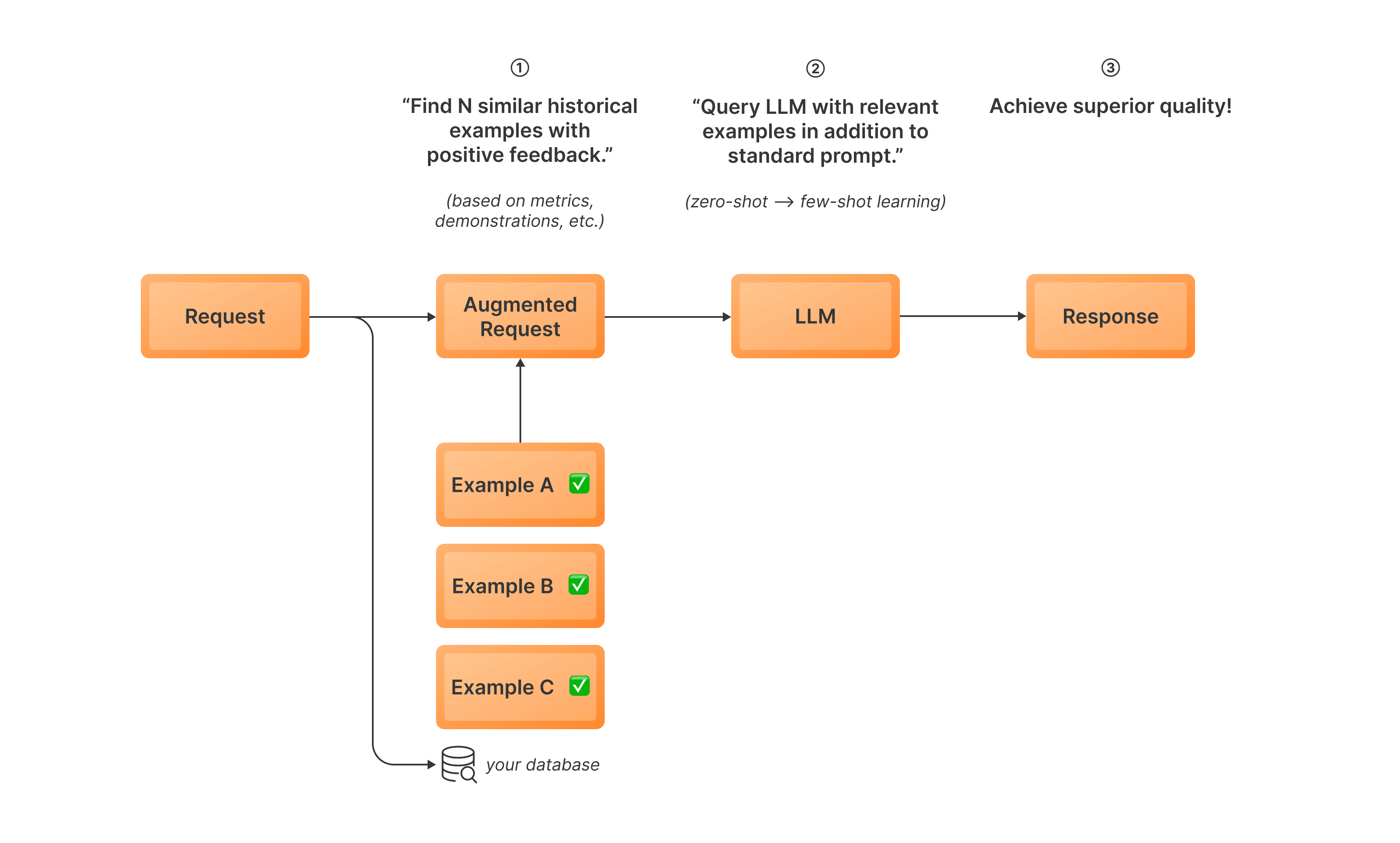
Dynamic In-Context Learning (DICL) is an inference-time optimization that improves LLM performance by incorporating relevant historical examples into your prompt. Instead of incorporating static examples manually in your prompts, DICL selects the most relevant examples at inference time. Here’s how it works:Documentation Index
Fetch the complete documentation index at: https://www.tensorzero.com/docs/llms.txt
Use this file to discover all available pages before exploring further.
- Before inference: You curate examples of good LLM behavior. TensorZero embeds them using an embedding model and stores them in your database.
- TensorZero embeds inference inputs before sending them to the LLM and retrieves similar curated examples from your database.
- TensorZero inserts these examples into your prompt and sends the request to the LLM.
- The LLM generates a response using the enhanced prompt.
When should you use DICL?
DICL is particularly useful if you have limited high-quality data.| Criterion | Impact | Details |
|---|---|---|
| Complexity | Low | Requires data curation; few parameters |
| Data Efficiency | High | Achieves good results with limited data |
| Optimization Ceiling | Moderate | Plateaus quickly with more data; prompt only but dynamic |
| Optimization Cost | Low | Generates embeddings for curated examples |
| Inference Cost | High | Scales input tokens proportional to k |
| Inference Latency | Moderate | Requires embedding and retrieval before LLM call |
Optimize your LLM inferences with Dynamic In-Context Learning
Configure your LLM application
Define a function with a baseline variant for your application.
tensorzero.toml
Example: Data Extraction (Named Entity Recognition) — Configuration
Example: Data Extraction (Named Entity Recognition) — Configuration
system_template.minijinja
Collect your optimization data
After deploying the TensorZero Gateway with Postgres, build a dataset of good examples for the
extract_entities function you configured.
You can create datapoints from historical inferences or external/synthetic datasets.Configure DICL
Configure DICL by specifying the name of your function, variant, and embedding model.You can also define a custom embedding model in your configuration.
Launch DICL
You can now launch your DICL optimization job using the TensorZero Gateway:DICL will embed all your training samples and store them in Postgres.
DICLOptimizationConfig
Configure DICL optimization by creating a DICLOptimizationConfig object with the following parameters:
Name of the embedding model to use.
Name of the TensorZero function to optimize.
Model to use for the DICL variant.
Name to use for the DICL variant.
Whether to append to existing variants. If
false, raises an error if the
variant already exists.Batch size for embedding generation.
Embedding dimensions. If not specified, uses the embedding model’s default.
Number of nearest neighbors to retrieve at inference time.
Maximum concurrent embedding requests.